










































New to KubeDB? Please start here.
Neo4j Volume Expansion Overview
This page explains how KubeDB Ops-manager expands Neo4j data volumes using Neo4jOpsRequest.
Before You Begin
- You should be familiar with Neo4j.
- You should be familiar with Neo4jOpsRequest.
- Your StorageClass must support
allowVolumeExpansion: true.
How Volume Expansion Works
The following diagram shows how KubeDB Ops-manager expands volume for a Neo4j database. Open the image in a new tab to see the enlarged version.
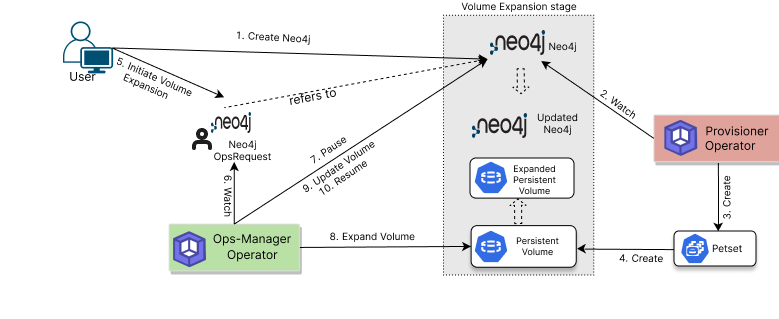
The volume expansion process consists of the following steps:
For a Neo4jOpsRequest with spec.type: VolumeExpansion, KubeDB Ops-manager:
- Validates requested size from
spec.volumeExpansion.server. - Validates expansion mode from
spec.volumeExpansion.mode. - Pauses conflicting reconciliations.
- Expands the target PVCs to the requested size.
- Reconciles Neo4j state based on online/offline mode requirements.
- Marks request
Successfulafter PVC and pod health checks.
Next Step
Follow the detailed guide: Expand Neo4j Volume.