










































New to KubeDB? Please start here.
Neo4j Horizontal Scaling Overview
This page explains how KubeDB Ops-manager performs horizontal scaling for Neo4j using Neo4jOpsRequest.
Before You Begin
- You should be familiar with Neo4j.
- You should be familiar with Neo4jOpsRequest.
How Horizontal Scaling Works
The following diagram shows how KubeDB Ops-manager performs horizontal scaling for a Neo4j database. Open the image in a new tab to see the enlarged version.
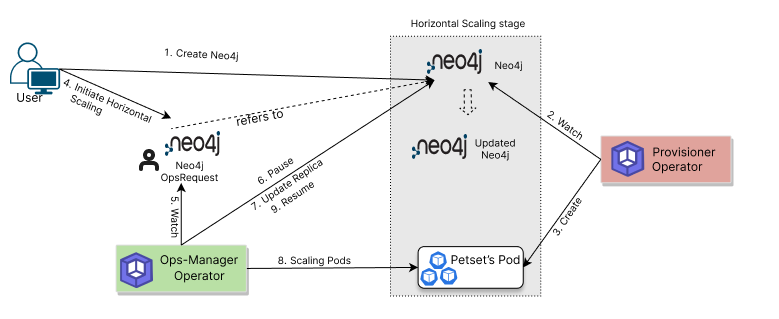
The horizontal scaling process consists of the following steps:
For a Neo4jOpsRequest with spec.type: HorizontalScaling, KubeDB Ops-manager:
- Validates the requested server count in
spec.horizontalScaling.server. - Pauses conflicting reconciliations for safe scale execution.
- Updates the target Neo4j server replica count.
- Applies reallocation policy from
spec.horizontalScaling.reallocate. - Waits for members and database hosting to reach a healthy state.
- Marks the operation
Successfuland resumes normal reconciliation.
Use Cypher views to verify topology and allocation after scaling:
SHOW DATABASE <name>for allocation status.SHOW SERVERSfor hosting distribution.
Next Step
Follow the detailed guide: Scale Neo4j Horizontally.