










































New to KubeDB? Please start here.
Reconfiguring TLS of Neo4j Database
This guide gives an overview of how KubeDB Ops-manager reconfigures TLS for a Neo4j database, including adding TLS, rotating certificates, updating issuer reference, and removing TLS through Neo4jOpsRequest.
Before You Begin
- You should be familiar with Neo4j.
- You should be familiar with Neo4jOpsRequest.
How Reconfiguring Neo4j TLS Works
The following diagram shows the TLS reconfiguration flow for a Neo4j database. Open the image in a new tab to see the enlarged version.
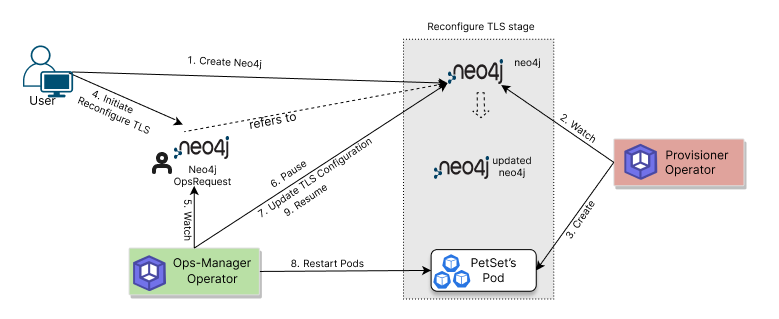
The process consists of the following steps:
- A user creates a
Neo4jCustom Resource. - KubeDB Provisioner reconciles the database and creates required workloads and secrets.
- To update TLS settings, the user creates a
Neo4jOpsRequestwithspec.type: ReconfigureTLS. - KubeDB Ops-manager watches the
Neo4jOpsRequestand validates thespec.tlsfields. - Ops-manager temporarily pauses conflicting reconciliation for the target database.
- It applies the requested TLS action (add/update via
issuerRef, rotate viarotateCertificates, or disable viaremove). - It rolls/restarts the required pods so updated TLS configuration is picked up.
- After successful checks, Ops-manager marks the request
Successfuland resumes normal reconciliation.
In the next guide, we show the step-by-step workflow for each TLS reconfiguration operation.
Next Step
- Follow: Reconfigure TLS in Neo4j.